


Why Google Reviews Matter for SEO and Trust (and How to Link to Them Properly)
Online reviews are today's version of word-of-mouth -- but with a far wider reach and more lasting influence. Reviews often determine whether shoppers will reach out to you -- or choose a competitor. And that is especially true for local small businesses.
Among all platforms, Google reviews are usually the first ones customers see and trust. Think of them as your public scorecard. Google consolidates feedback from across the web to help people understand where your business shines, where you can improve, and what customers can expect when working with you.
In this guide, you'll learn:
1. Why Reviews Matter for SEO #
Google reviews influence your visibility in three key areas:
- Local Map Pack (the 3 Google search listings beneath the map)
- Organic local search results (the regular blue links)
- Knowledge panel (the business information box on the right)
Google has confirmed that reviews help determine:
- Social Proof & Credibility – Is this business legitimate and trustworthy?
- Relevance – Do keywords mentioned in the reviews match what searchers want?
- Authority & Prominence – Does this look like an established expert?
- Recency – Are reviews fresh and consistent?
- Engagement – Review snippets influence click-through rates.
- Responsiveness – Active replies show professionalism and care.
Businesses with more (and more recent) reviews tend to:
- rank higher in the search results
- convert more visitors into customers
- attract more clicks thanks to those 4- and 5-star visual cues
You don't need dozens per month. Even 1–2 new reviews monthly can meaningfully improve freshness, relevance, and authority.
2. Why Reviews Matter for Customer Trust #
Even if rankings didn't matter (they do!), reviews strongly influence customer decisions. Most people:
- read reviews before contacting a business
- trust reviews almost as much as personal recommendations
- judge star ratings within seconds
- compare similar businesses using review quantity + recency
A business with a 4.7 rating and dozens of fresh reviews usually outperforms a competitor with 5.0 stars and only a few reviews. Consistency and authenticity matter more than perfection.
3. Which Review Platforms Influence Google? #
Google primarily evaluates its own reviews but also pulls signals from platforms such as:
- Yelp
- TripAdvisor
- Angi / HomeAdvisor
- Better Business Bureau (BBB)
- Trustpilot
- Industry-specific sites (Zillow, Healthgrades, Houzz, OpenTable, Avvo, etc.)
Your knowledge panel may show "Reviews from the web," which aggregates these sources. Google looks for:
- consistency across platforms
- strong overall sentiment
- recent activity
- authentic feedback
- a complete business identity across the web
This reflects Google's broader E-E-A-T guidelines .
4. You Must First Claim and Complete Your Google Business Profile #
Until you 'claim' your Google Business Profile, you're unable to:
- respond to reviews
- request review removals
- update business information
- add photos
- generate your shareable review link
Many businesses don't realize this -- they may have reviews but no control over their listing.

Need help preparing your Google Business Profile?
Check out our companion guide: How to Claim and Complete Your Google Business Profile (and Why It Matters).
Better yet, have our Joe Web site design experts do it all for you. Call us in Asheville, NC at 828-551-9761.
5. How to Get Your Google Review Links (Read vs. Request) #
Unfortunately, they don't make it easy to find the links for requesting and displaying Google reviews. They're tucked inside your Business Profile dashboard -- not on Google Maps. And there are two different links:
A) "Read Reviews" Link
Shows all your reviews. Good for websites. Not ideal for requesting new ones.
B) "Request a Review" Link
Opens the review window so customers can write a review instantly. Designed for outreach.
Where to find both links:
- Sign in with the Google account that manages your business.
- Search your business name directly in Google.
- Your "Business on Google" dashboard will appear.
- Click Read Reviews to copy the public reviews link.
- Click Ask for Reviews to reveal the official request link.
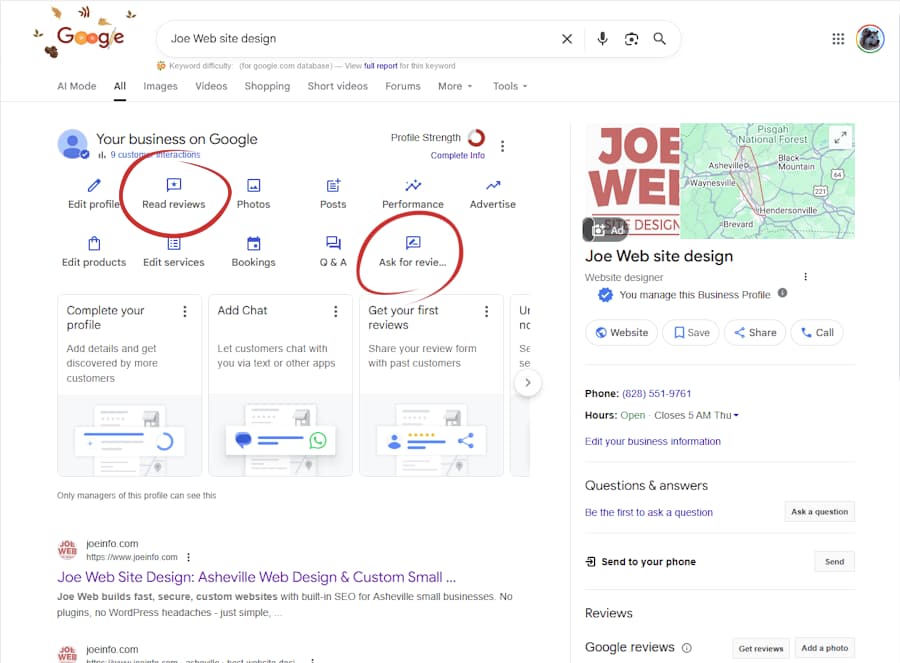
The 'Your Business on Google' dashboard is where you'll find the links for your 'Read Reviews' and 'Ask for Reviews.'
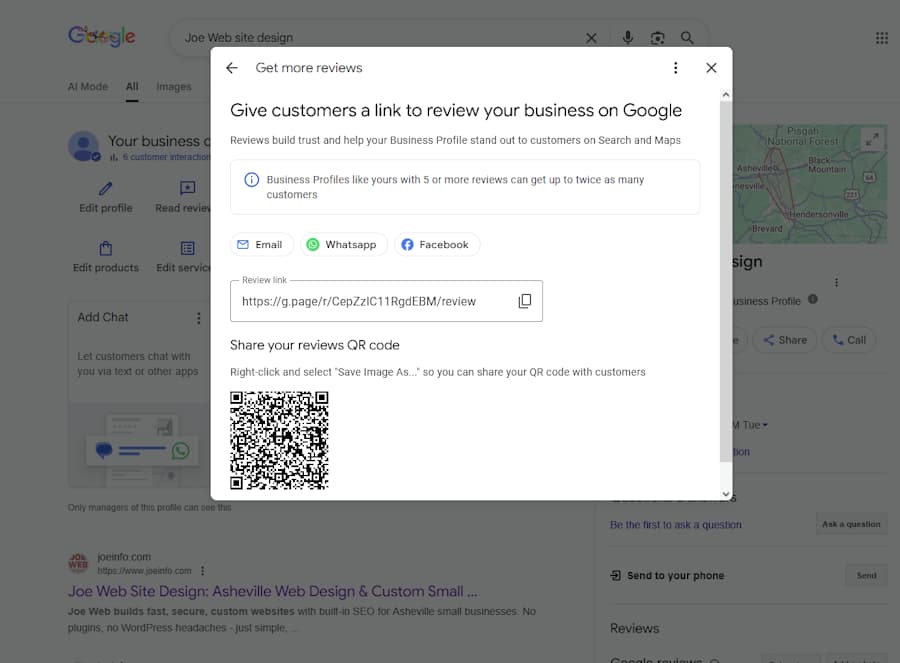
Requesting reviews is the key to getting more reviews. Make it easy for your customers and clients by providing a direct link.
Google sometimes displays icons instead of text -- which can be confusing. Copy both links for outreach and your website.
6. Where Should You Use Each Link? #
Use the Read Reviews link on:
- your homepage
- website footer
- testimonial pages
- trust sections
- social media profiles
Use the Request a Review link in:
- follow-up emails
- post-project thank-you messages
- newsletters
- receipts
- QR codes at your location
Do NOT place the request link publicly on your website. It can appear pushy, and Google intends it for personal outreach.
7. How to Encourage New Reviews (Ethically) #
Google prohibits incentives such as discounts or gifts. But you can ethically encourage customers to review your business.
What you can do:
- send a friendly follow-up email
- explain how reviews help small businesses
- include the direct request link
- keep the process quick and easy
What you cannot do:
- offer incentives
- ask only for 5-star reviews
- discourage or filter negative feedback
- review your own business
- have employees submit reviews
Example request:
Hi Dear [Customer Name],
We hope you enjoyed your experience with us. Your feedback is valuable for helping us improve, so we'd be grateful if you could share your thoughts on Google here: [Link]
Thank you again!
[Your Name]
[Your Title/Role at the business]
A short, sincere message always works best.
8. Why Responding to Reviews Matters #
Google has publicly stated that responding to reviews -- both positive and negative -- supports:
- trust signals
- engagement metrics
- local ranking factors
How to respond to positive reviews:
- thank the reviewer
- reference something specific
- keep it personal and warm
- sign your name
Example response:
Dear [Customer Name, if known],
We're glad you were happy with the website redesign -- thank you again for trusting our team!
How to respond to negative reviews:
Use the Thank > Empathize > Clarify > Invite Offline formula.
Example response:
Dear [Customer Name, if known],
Thank you for the feedback -- I'm sorry to hear you had this experience. Customer satisfaction is our #1 goal, so I'd love to learn more and try to make it right.
Could you contact me directly at [your email address] or [your phone number]?
Sincerely,
[Your Name]
[Your Title/Role at the business]
Never argue or blame. You're writing for the next 100 people who will read your reply.
9. FAQ: Google Reviews for Small Businesses #
 What is a Google review?
- Feedback customers leave on your Google Business Profile that's visible to anyone searching for your business.
- Do reviews affect SEO?
- Yes -- they are a strong signal for search engine rankings, click-through rates, and customer trust.
- Where do I find the link to our Google Reviews?
- Search your business name while logged into your Google Business Profile owner account. The exact steps for finding the links to your Google reviews (both 'read' and 'request') are outlined above in this post.
- What if my business doesn't have reviews yet?
- Start by completing your Google Business Profile. Then share your request link with recent customers.
- Can I delete a bad review?
- Only if it violates Google's policies. Otherwise, reply professionally. And try to earn as many 'good' reviews as possible to dilute the power of those that are negative.
- Should I respond to every review?
- Yes -- it shows appreciation, activity, and professionalism.
- Can customers leave reviews without a Google account?
- They need a Google login, but not necessarily a Gmail address.
- Can I put my review link on my website?
- Yes -- use the "read reviews" link. Avoid using the "request" link publicly.
- Does Google consider reviews from other sites?
- Yes -- platforms like Yelp, Facebook, TripAdvisor, and industry-specific sites also influence Google's understanding of your reputation.
- Do customers actually read reviews?
- Absolutely. Reviews are often the first thing people check before clicking through to your site.
- How can I display our Google reviews on our website?
- The easiest method is to embed them using third-party widgets such as Elfsight, Trustindex, or EmbedSocial. These tools provide a small script you can paste into any HTML or PHP page. If you prefer not to use a paid widget, you can manually feature selected reviews and link to your full Google reviews page.
- Are those review widgets only for WordPress?
- No -- they work on any website. Each service offers a simple script embed you can paste into any site, regardless of CMS.
- Are Google Customer Reviews the same as Google Business Profile reviews?
No -- they are two different review systems. And for most businesses, you do not need both.
Google Business Profile reviews are the most important for local and service-based businesses. These are the reviews that influence Google Maps, local search rankings, and your Knowledge Panel when someone searches for your business name.
Google Customer Reviews, on the other hand, are designed specifically for e-commerce businesses that sell products online and run Google Shopping or paid ads. They collect feedback after online purchases and help power seller ratings in ads -- not local search visibility.
If online sales are a significant part of your business, you can learn more about Google's seller ratings program through Google Merchant Center.
(Google also offers a third system called Product Ratings, which are strictly for product-specific reviews and do not apply to service businesses.)
10. Final Thoughts
Customer reviews are one of the strongest tools you have for building trust and demonstrating expertise. They're more visible than your website, more persuasive than advertising, and more influential than most business owners realize. Plus, they're free!
By understanding how Google uses reviews, how to link to them properly, and how to earn new ones, you'll build long-term credibility and visibility that paid ads simply can't match.
Want help generating a strong portfolio of reviews -- and making them work to your advantage?



 EMail:

